Enter our name and email address in the invitation form.
NameDannerr Tech
Emaildquarton@gmail.com
3
Permissions
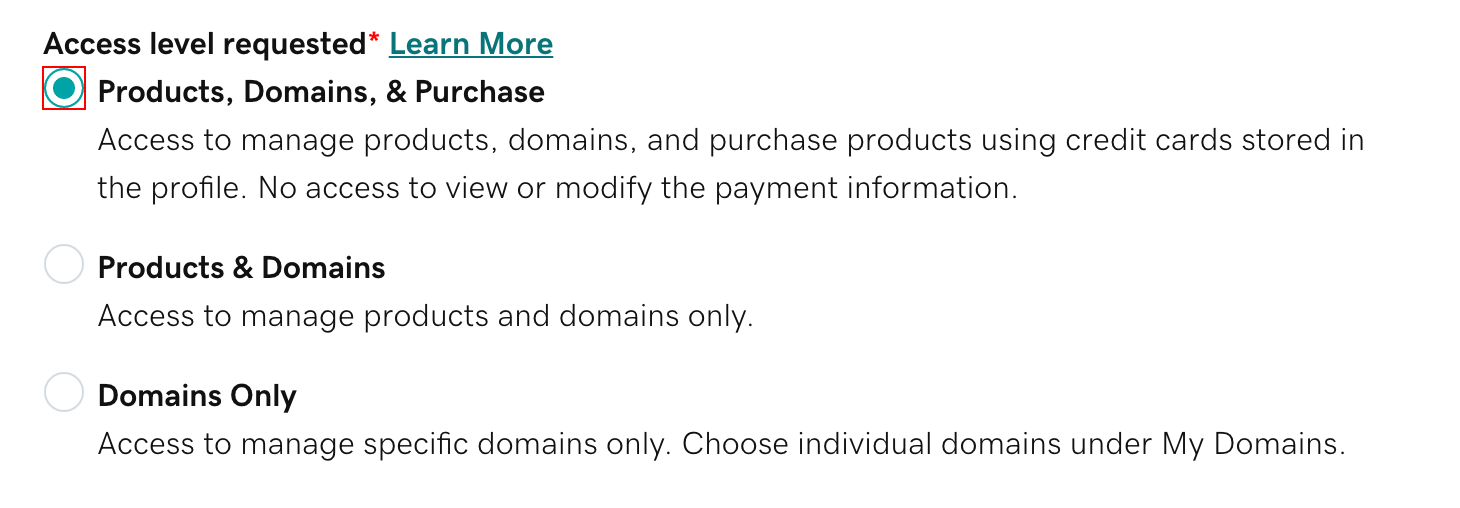
Choose Products & Domains
For normal website and domain management, choose Products & Domains. This lets us work with your GoDaddy products and domains but does not let us make purchases using your saved payment method.
Actual GoDaddy access-level screen from GoDaddy's current documentation. Select Products & Domains rather than Products, Domains, & Purchase unless you have specifically agreed otherwise.
✓
Your secure details remain private.
Delegates cannot view or change your password, Support PIN or payment methods, and they cannot invite other people into your account.
i
Only need us to manage the domain?
You can instead choose Domains Only. For most website projects, Products & Domains is more practical because it avoids needing another invitation if we need to access another GoDaddy product later.
4
Finish
Send the invitation
Click Invite. GoDaddy will email us a link to review and accept the access.
✓
That is it.
Once we accept, you will see us listed under People who can access my account. You can change our access level or remove us at any time.
!
Invitation expiry
GoDaddy invitations normally expire after roughly 48-72 hours. If we do not accept it in time, you can simply send a new invitation.
What we cannot do
✓We cannot see or change your GoDaddy password or Support PIN.