1
Delegate access
Open the Delegate Access page
Sign in to GoDaddy and open the Delegate Access page. Under People who can access my account, click Invite to Access.
2
Invite
Enter our details
Enter our name and email address in the invitation form.
NameYour Web Developer
EmailYOUR-EMAIL@EXAMPLE.COM
3
Permissions
Choose Products & Domains
For normal website/domain management, choose Products & Domains. This lets us work with your GoDaddy products and domains but does not let us make purchases using your saved payment method.
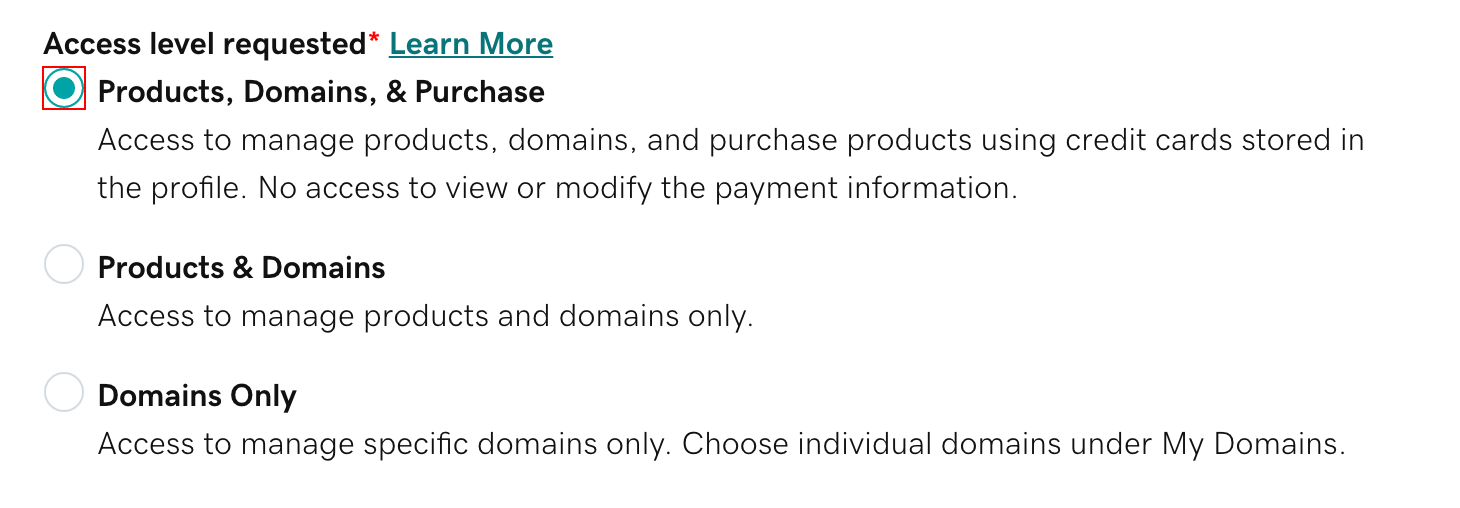
Actual GoDaddy access-level screen from GoDaddy's current documentation. Select Products & Domains rather than Products, Domains, & Purchase unless you have specifically agreed otherwise.
Your secure details remain private.Delegates cannot view or change your password, Support PIN or payment methods, and they cannot invite other people into your account.
Only need us to manage the domain?You can instead choose Domains Only. For most website projects, Products & Domains is more practical because it avoids needing another invitation if we need to access another GoDaddy product later.
4
Finish
Send the invitation
Click Invite. GoDaddy will email us a link to review and accept the access.
That is it.Once we accept, you will see us listed under People who can access my account. You can change our access level or remove us at any time.
Invitation expiryGoDaddy invitations normally expire after roughly 48–72 hours. If we do not accept it in time, you can simply send a new invitation.
What we cannot do
We cannot see or change your GoDaddy password or Support PIN.
We cannot view or manage your payment methods.
We cannot invite other people to your account.
You can remove our access whenever you want.